Tuples in Python

With hands-on experience from my internships at Samsung R&D and Wictronix, where I worked on innovative algorithms and AI solutions, as well as my role as a Microsoft Learn Student Ambassador teaching over 250 students globally, I bring a wealth of practical knowledge to my Hashnode blog. As a three-time award-winning blogger with over 2400 unique readers, my content spans data science, machine learning, and AI, offering detailed tutorials, practical insights, and the latest research. My goal is to share valuable knowledge, drive innovation, and enhance the understanding of complex technical concepts within the data science community.
Are you seeking a resource that can teach you all there is to know about tuples in Python? If so, you've come to the correct spot. You'll be equipped to work with tuple data structure once you've finished reading this blog post. Let's get started without further delay.
What is a tuple?
In Python, a tuple is an ordered data structure that is immutable and has fewer features than a list. Tuples are also referred to as "immutable lists." As with lists, tuples come in four different varieties: empty, one-dimensional, two-dimensional, and three-dimensional.
# Empty tuple
t1 = ()
# 1d tuple
t2 = (1,2,3)
# 2d tuple
t3 = (1,2,3,(4,5))
# 3d tuple
t4 = (1,2,3,(4,5,(6,7)))
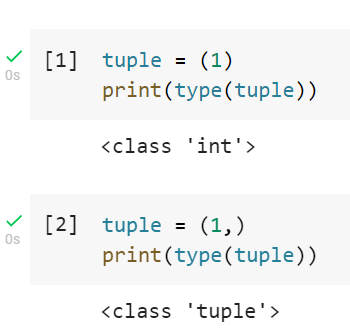
The special syntax for a tuple of one item
An important thing to remember when creating a tuple with a single item is to always use a comma (,) after it; otherwise, that item will be stored as its own datatype instead of a tuple.
How tuple is different from the list
There are a large number of distinctions between a list and a tuple, including the following:
| Tuple | List |
| A tuple is immutable, so once it has been initialized, its contents cannot be changed. | The list is mutable, which means that we can easily change the items present in the list as we want. |
| Tuple occupy less space in the memory | List occupies more space in the memory |
| The execution speed of a tuple is faster than list | The execution speed of a list is slower than a tuple |
| The syntax for creating a tuple is ( ) | The syntax for creating the list is [ ] |
Similarities between list and tuple
Both lists and tuple use zero-based indexing
The order in which data is stored is significant because both tuples and lists are linear/ordered data structures. Even though the data are different, the order in which the data is stored matters. For example, 1,2,3 3,2,1. Even though the data are different, the order is different, such as 1,2,3 != 3,2,1.
When to use tuples?
When we want the user to simply be able to read the data, we should use a tuple; however, if we want the user to be able to modify the data, we should not. For instance, since tuples are immutable, we should never use them to create to-do list applications because the user has to be able to modify the data.
Operations on tuple
Tuple data structures provide three different types of operations: arithmetic operations, membership operations, and traversal ( item-wise or index-wise).
# Arithmetic operations using + and * operators
tuple_1 = (1,2,3,4)
tuple_2 = (5,6,7,8)
print(tuple_1 + tuple_2)
print(tuple_2 * 2)

# Membership operation
print(1 in tuple_1) -> True
print(6 in tuple_1) -> False
# Item-wise traversal
tuple = (1,2,3,4)
for item in tuple:
  print(item)

# Index-wise traversal
tuple = (1,2,3,4)
for i in range(0,len(tuple)):
  print(tuple[i])
Function of tuples
Tuples are immutable, so there are significantly fewer tuple functions overall than there are for list data structures.
tuple = (1,2,3)

# For finding lenght of th tuple
print(len(tuple))
# For finding maximum value in homogenous numerical tuple
print(max(tuple))
# For finding minimum value in homogenous numerical tuple
print(min(tuple))
# For finding index of a value
print(tuple.index(2))
# For doing out-of-place sorting in ascending order ( returns list )
print(sorted(tuple))
# For doing out-of-place sorting in descending order ( returns list )
print(sorted(tuple,reverse = True))


